Healthcare coalition member portal

One portal for the whole coalition.

Hospitals, EMS, public health, emergency management, and long-term care, working from one roster, one library, one calendar, one work plan, and one record of decisions. coalition1 replaces the email blasts, shared drives, and spreadsheets a coalition runs on today.

Pricing is scoped per coalition. Email and you get a quote and a walkthrough, not a sales sequence.

coalition1 dashboard for a demonstration coalition: deliverables due, upcoming events, active discussions, recent announcements, and new library documents on one screen
Hospitals and health systems
EMS agencies
Public health
Emergency management
Long-term care and outpatient

Five sectors, dozens of organizations, one small staff holding it together. That is the job coalition1 is built for.

The shortfalls

Today, a coalition runs on everything except a system.

A regional healthcare coalition is a partnership of independent organizations with a grant-funded staff of one or two. Ask how the work actually gets done and the answer is a stack of consumer tools held together by the coordinator's inbox.

Communication

Information is pushed, not pulled.

Meeting notices, documents, surveys, and deadlines all go out as email blasts. Members scroll past, staff resend, and nobody can tell who saw what. The record of what was communicated lives in one person's sent folder.

Documents

The plans live everywhere.

Base plans, annexes, hazard vulnerability analyses, bylaws, and meeting minutes sit across shared drives, inbox attachments, and personal folders. Finding out which version is current is a phone call.

Membership

The roster is a spreadsheet.

Who belongs, which organization they represent, who holds a committee seat, and who is still active are maintained by hand. The list is wrong the week after it is cleaned up, and new member organizations wait for someone to find time.

Deliverables

Grant work is tracked out of sight.

Preparedness program deliverables and state reporting live in a staff spreadsheet. Members cannot see progress or where funding went, and the coordinator carries every deadline alone.

Governance

Decisions have no trail.

Steering committee approvals happen in email replies. When a funder, an auditor, or a new chair asks who approved what and when, someone rebuilds the answer from an inbox.

Continuity

Every coalition rebuilds the same stack.

A website here, a drive there, a mailing list, a survey tool, a calendar. Staff turnover resets all of it. Across a state, no two coalitions work the same way, and no member who sits on two of them sees the same thing twice.

These are not people problems. They are the predictable result of running a regional partnership on tools built for individuals. The fix is unification: one platform that holds the members, the record, and the work together, so the coalition can act as one healthcare system instead of a mailing list.

Unification

Unify the members, the record, and the work.

coalition1 is built around the three things a coalition has to hold together. Each one is a first-class part of the portal, not a bolt-on.

1

The members

One roster that is the truth, maintained by the people in it.

  • Four roles: member, steering committee, staff, administrator
  • Organization membership on every profile
  • Committee positions with named holders
  • Access requests with approval by email domain
  • Onboarding that happens in the portal, not in an inbox
2

The record

Everything the coalition produces, findable, versioned, and in one place.

  • Document library with categories and version history
  • Meeting records with materials and recordings
  • Announcements members pull when they need them
  • A shared calendar for meetings, trainings, and exercises
  • Discussion boards with a searchable archive
3

The work

The grant deliverables, the money, the decisions, and the follow-through.

  • Work plan with deliverables by capability and deadline alerts
  • Project funding from opportunity to award
  • Committee approvals with signatures on file
  • After-action reviews and corrective actions to closure
  • Forms the coalition builds itself, with response analytics

One product. One instance per coalition. The same thing everywhere.

Each coalition runs its own coalition1 instance with its own isolated database, its own domain, and its own branding. A state or region that standardizes on coalition1 gets coalitions that look and work the same, members who move between them without relearning anything, and staff turnover that no longer takes the system with it.

The public landing page of a demonstration coalition: coalition name, mission, about section, and member login
The platform

What a coalition gets on day one.

Every screen below is the portal as it ships today, shown on a demonstration coalition. Every organization, person, and document in the screens is fictional.

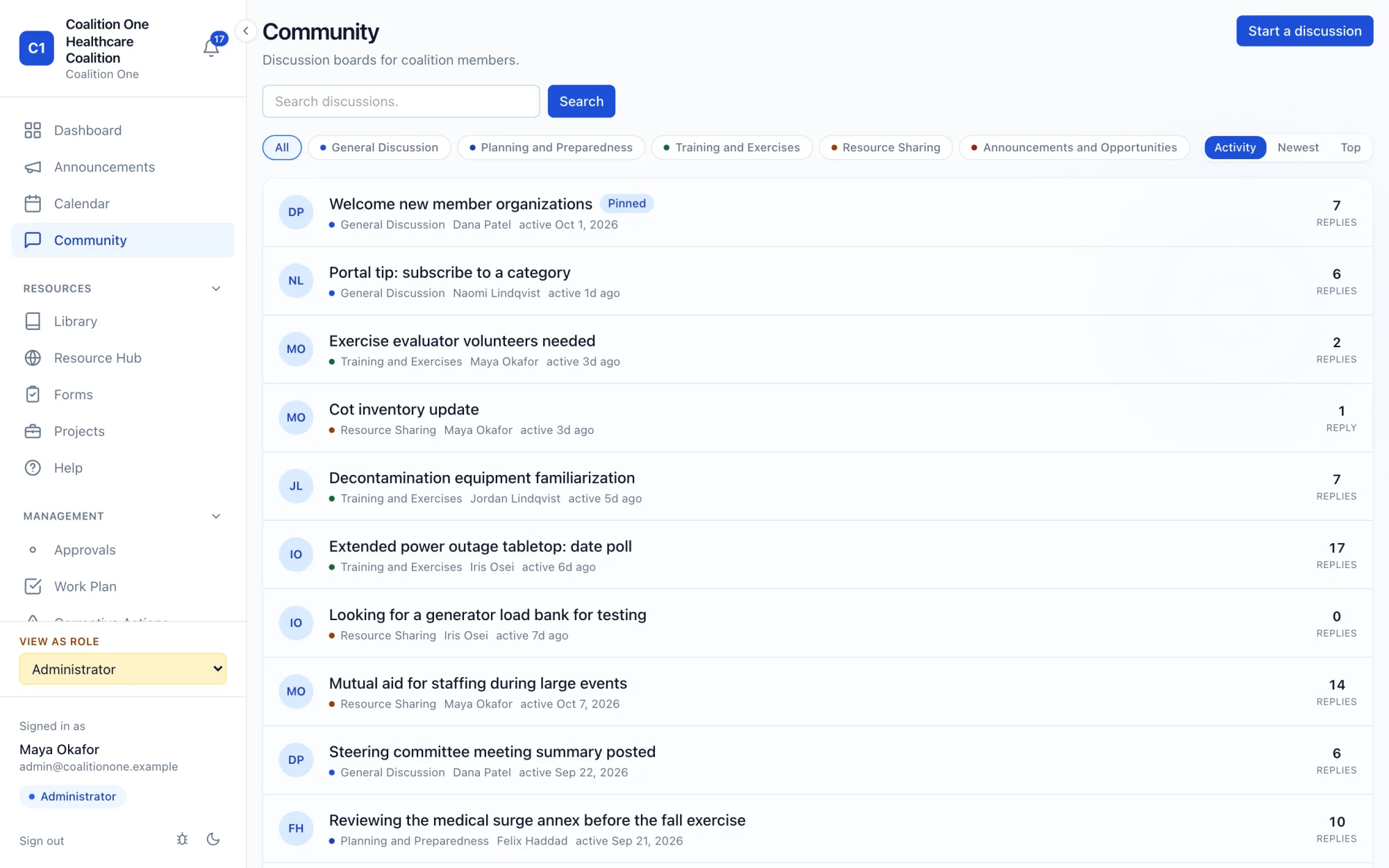
Community

Discussion boards that replace the reply-all.

Categories for general discussion, planning, training and exercises, resource sharing, and opportunities. Members follow the threads they care about and get notified on replies. Staff can pin, close, and archive. The archive is searchable, so last year's answer is still findable.

Community discussion board with categorized threads, reply counts, and activity sorting
Library

One library, with versions.

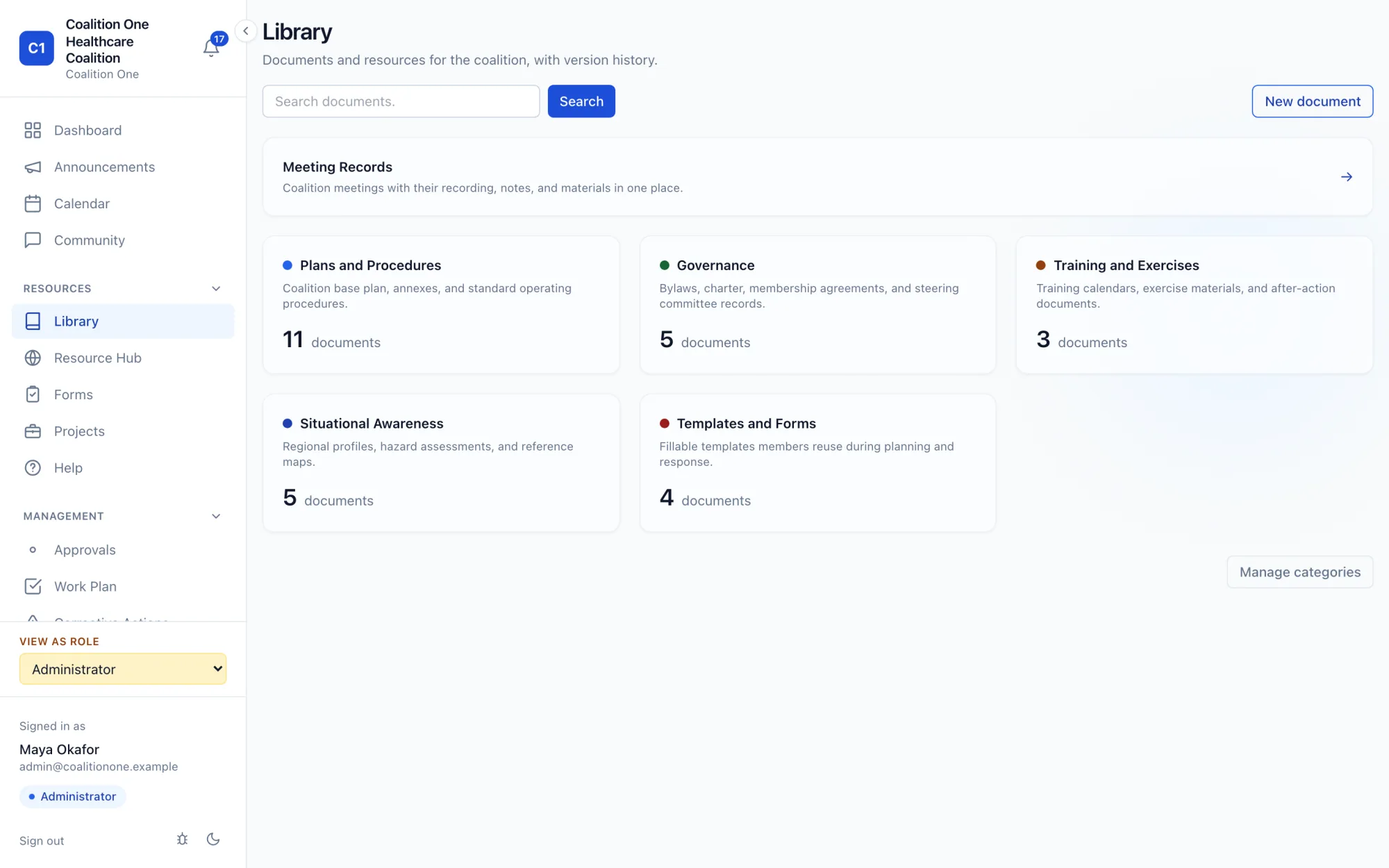
Plans and procedures, governance, training and exercises, situational awareness, and templates, each with a version history. Meeting records keep the recording, notes, and materials for every meeting in one place. Every file can be previewed before it is downloaded.

Document library organized by category with document counts and a meeting records section
Calendar

Regional situational awareness for scheduling.

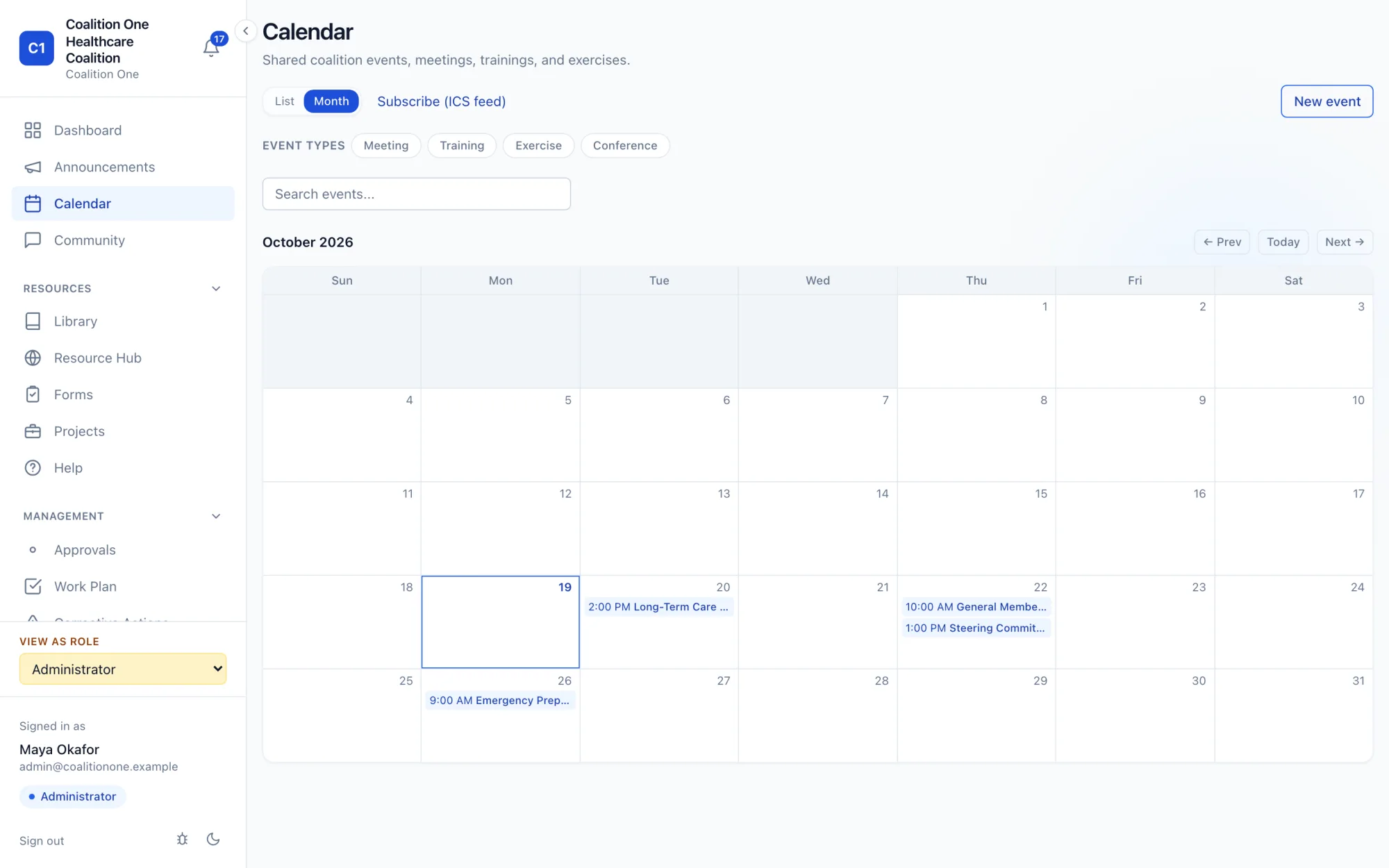
Meetings, trainings, exercises, and conferences on one calendar the whole region can see, so a full-scale exercise does not land on the same day as a partner's academy class. Members register in the portal, get reminders, and can subscribe from their own calendar app.

Shared coalition calendar in month view with meetings, trainings, and exercises
Work plan

Grant deliverables in the open.

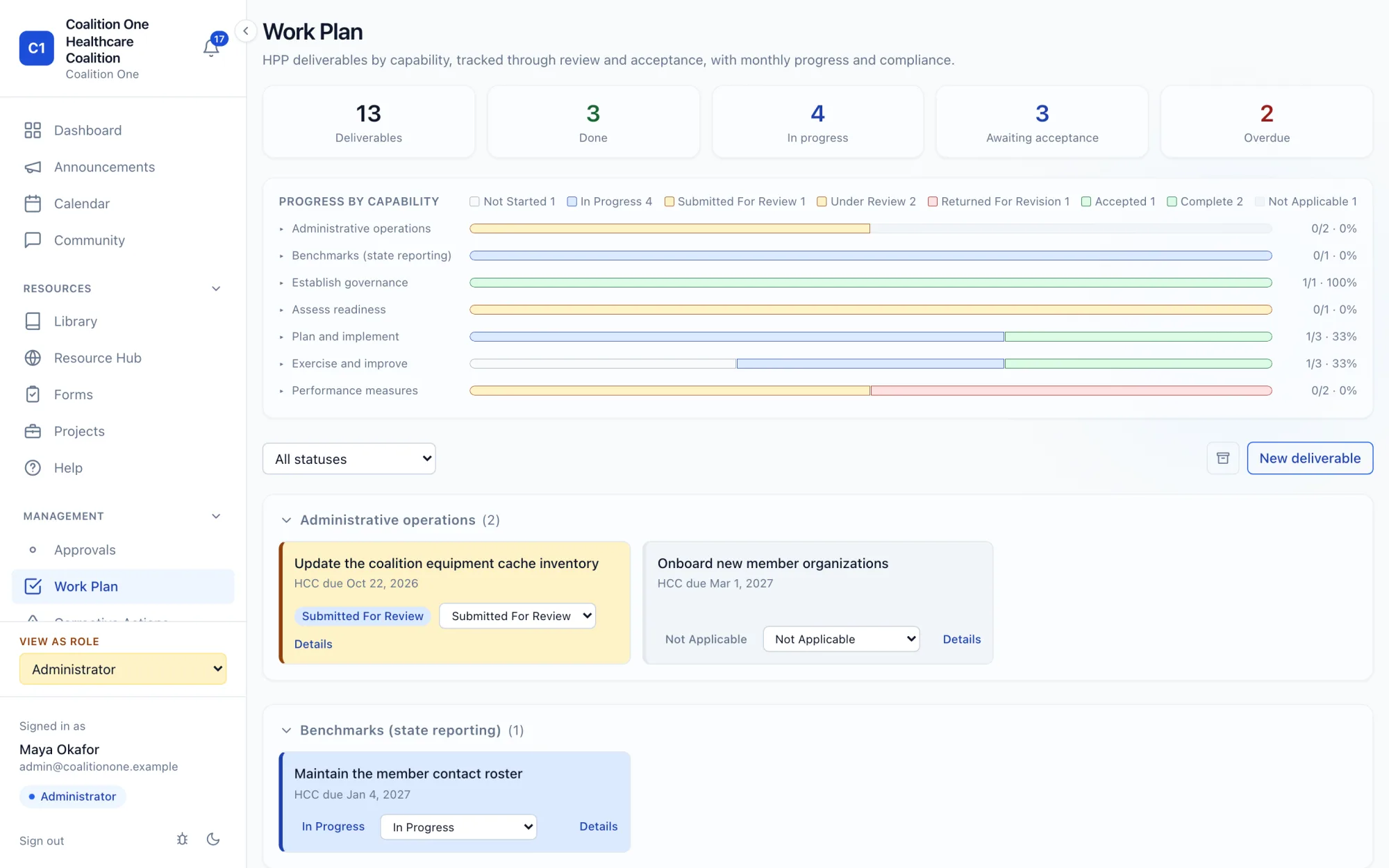
Preparedness program deliverables tracked by capability, with status from not started through accepted, progress by capability, and deadline alerts. Steering committee members see the plan. Staff stop carrying it alone.

Work plan with deliverable counts, progress by capability, and deliverable cards grouped by capability
Project funding

From opportunity to award, with a ledger.

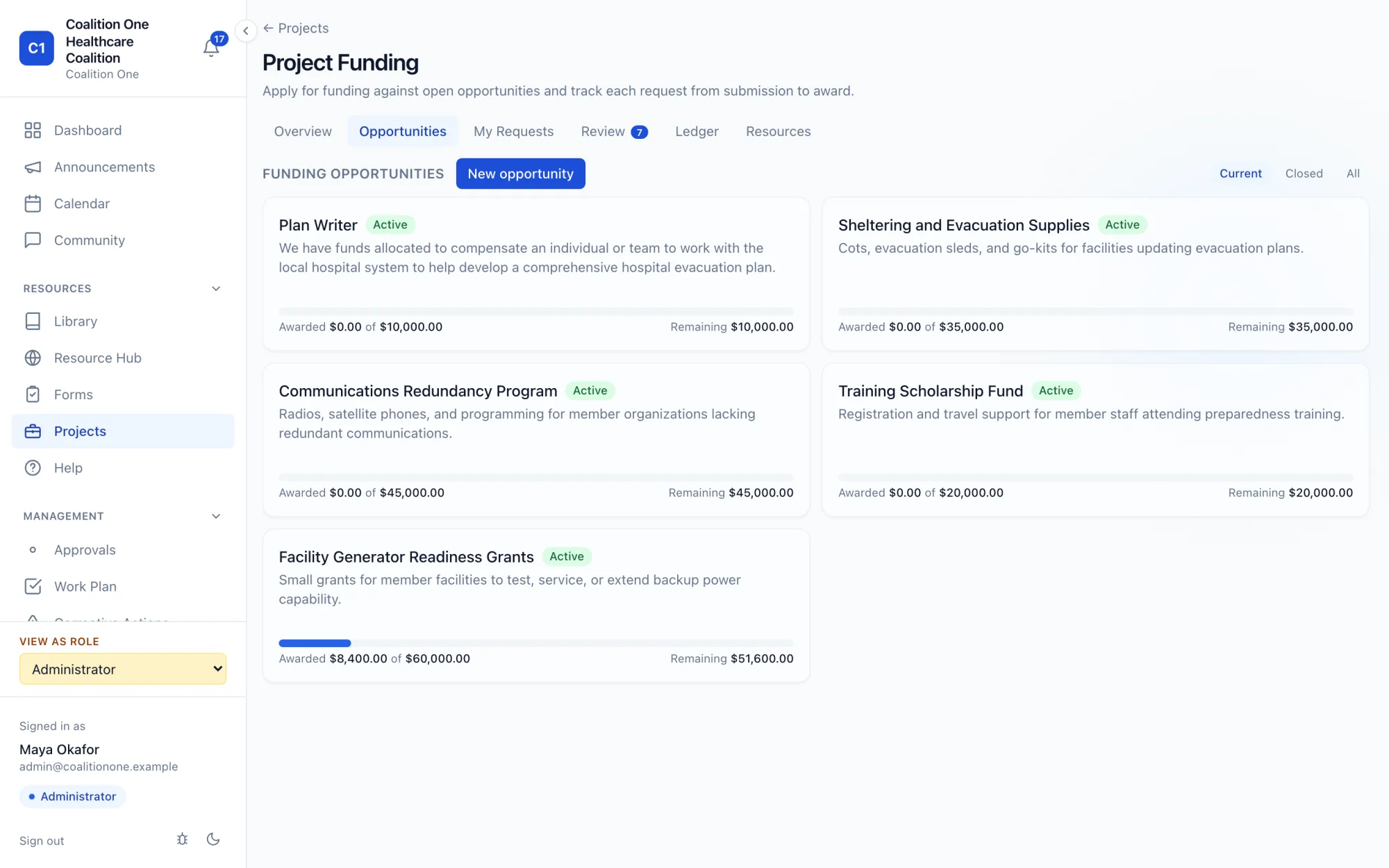
Post funding opportunities, take applications from member organizations, route them through steering committee review, and allocate against the opportunity. Members can see what was awarded and what remains.

Project funding opportunities with awarded and remaining amounts and a review tab
Approvals

Decisions with a trail.

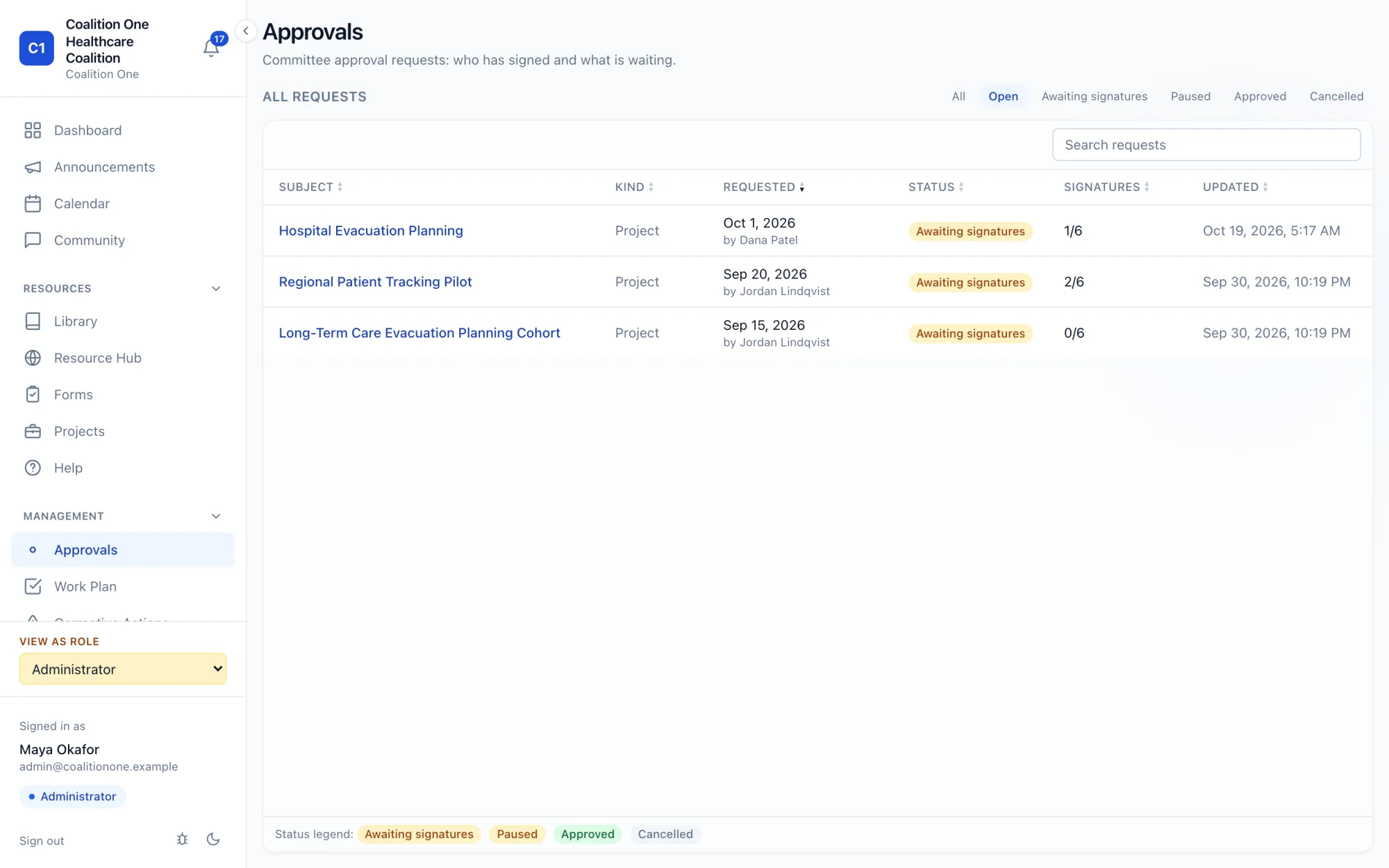
Committee approval requests go to the people who hold the positions. Each signer signs with a signature on file and a PIN. The portal records who signed, who is still waiting, and when it closed, and generates the approval document. A decline pauses the request instead of losing it.

Approvals list showing requests awaiting signatures with signature counts and status
Corrective actions

After-action reviews that close.

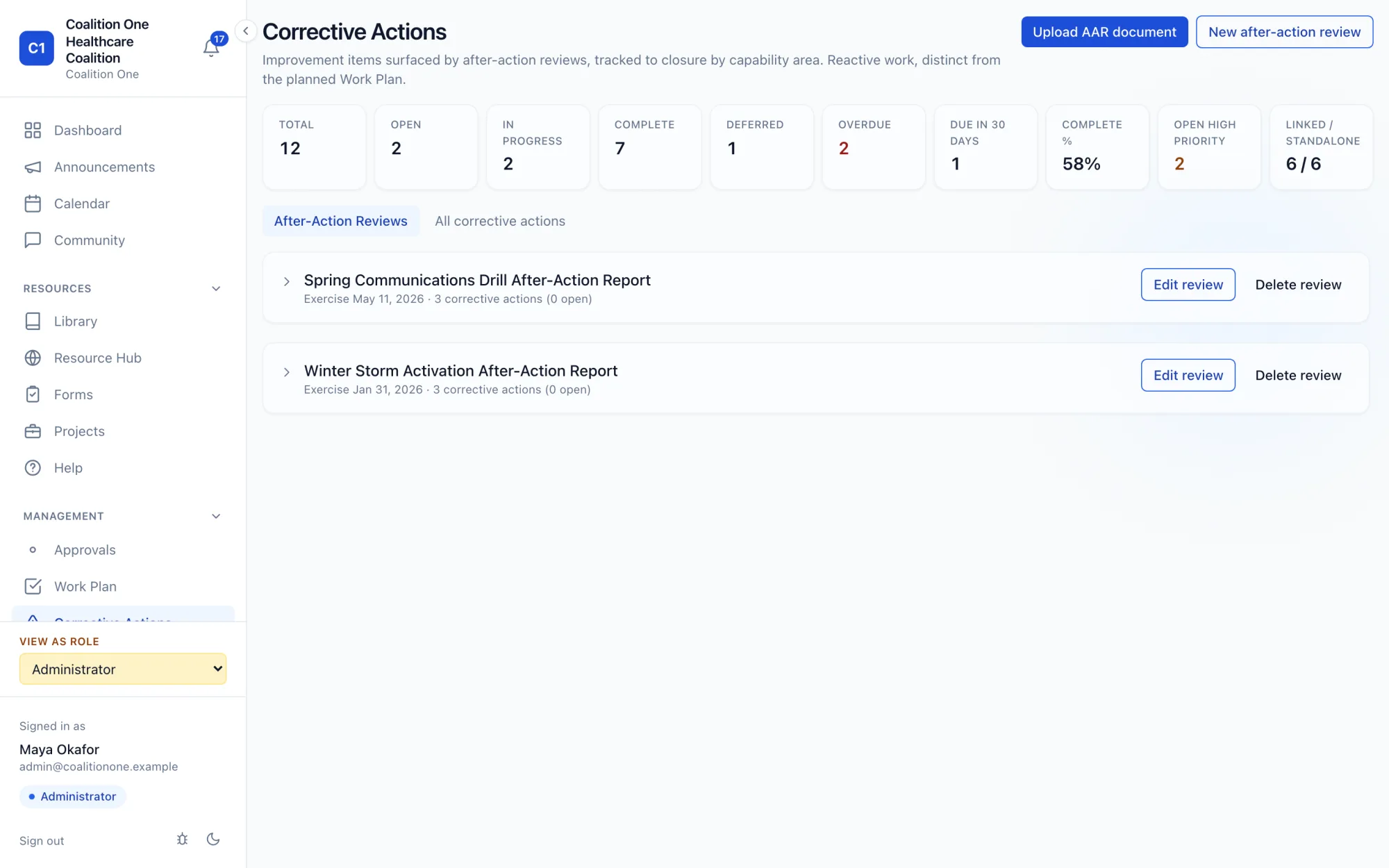
Upload an after-action report or start a review in the portal, track every corrective action by priority and owner, and watch the improvement items go from open to complete instead of into a binder.

Corrective actions page with totals, open and overdue counts, completion percentage, and after-action reviews
Forms

Build the survey. Keep the answers.

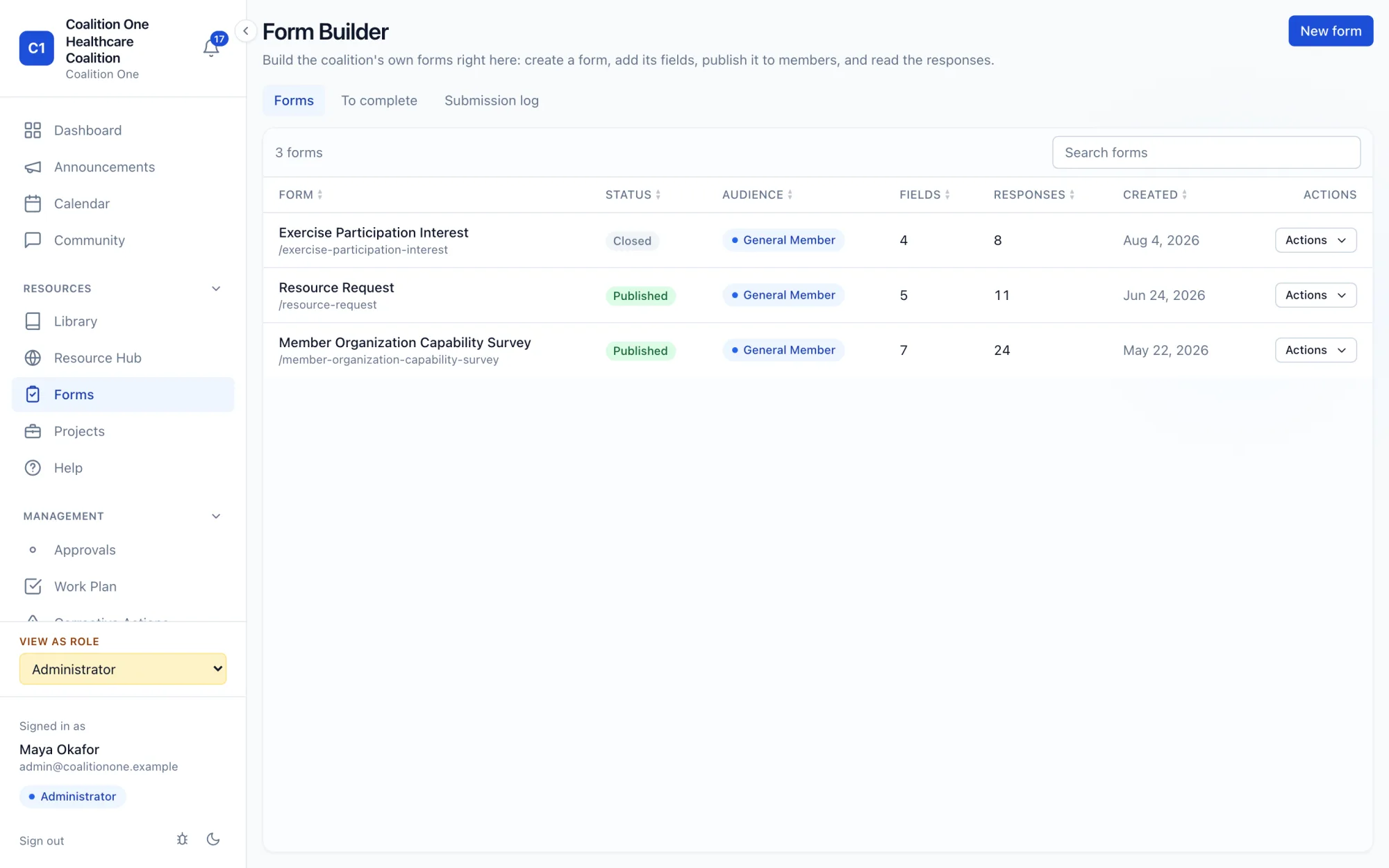
Staff build forms in the portal: capability surveys, resource requests, exercise participation. Name, email, and organization fill themselves in from the member's account. Responses stay with the coalition, with analytics by question, and a funding request can start from a form.

Form builder listing coalition forms with status, audience, field counts, and responses
Administration

The roster, maintained where the members are.

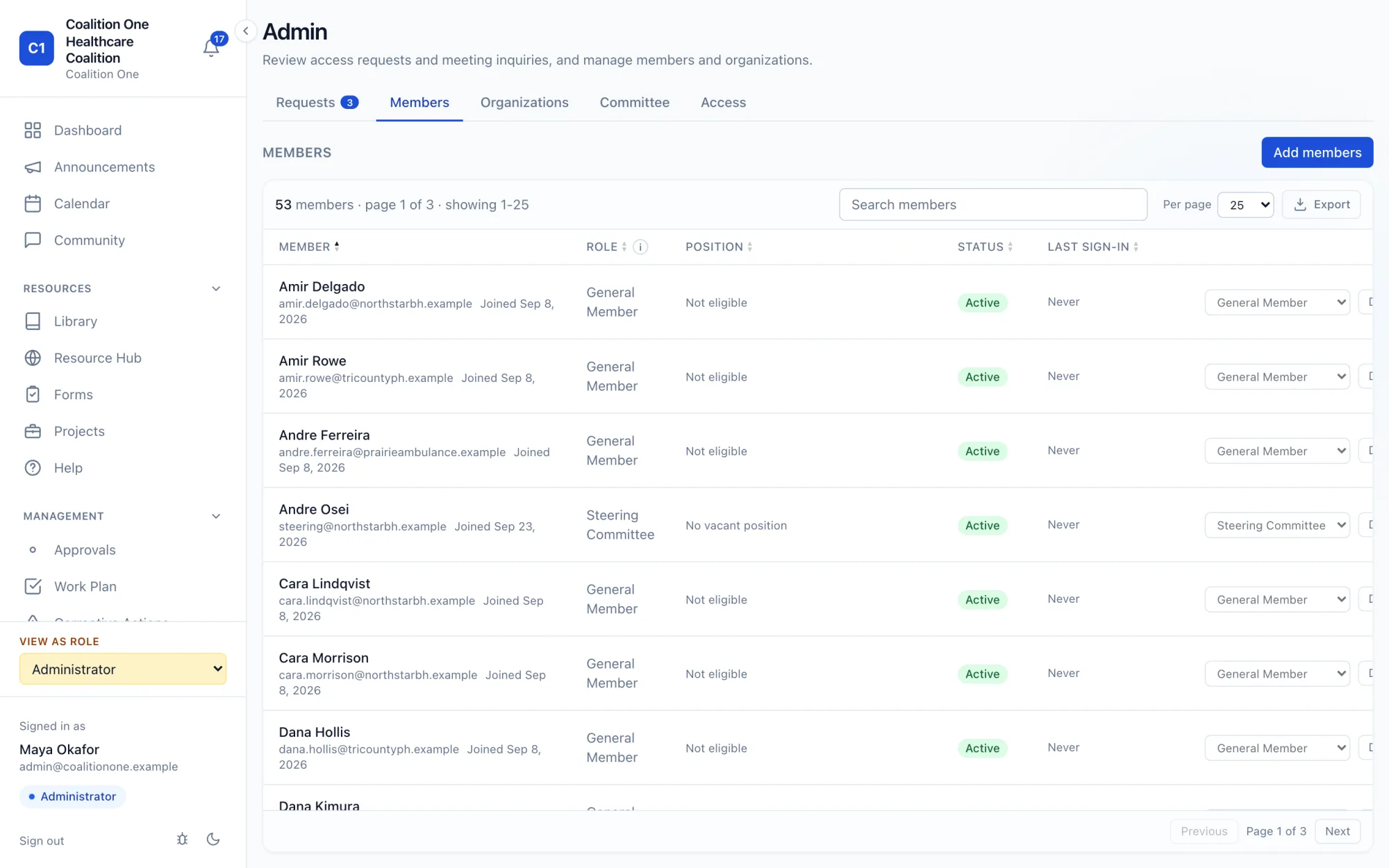
Access requests, members, organizations, committee seats, and role permissions on one admin screen. Approve a new organization once and its people are auto-approved by email domain. Export the roster when the state asks for it.

Admin members tab with a searchable roster showing role, position, status, and last sign-in
Roles

Built for how a coalition is actually organized.

Four roles, each seeing exactly what it should. An administrator can view the portal as any role to check what a member sees.

Member

Anyone from a member organization

  • Dashboard, announcements, calendar
  • Community boards and library
  • Forms, projects, funding requests
  • Notifications and account

Steering committee

Position holders and advisory board

  • Everything a member sees
  • Approval requests and signatures
  • Work plan and deliverable progress
  • Funding review and endorsements

Staff

Coalition coordinator and program staff

  • Corrective actions and after-action reviews
  • Form builder and response analytics
  • Email composer and site banners
  • Meeting records and library management

Administrator

Whoever owns the portal

  • Access requests and the roster
  • Organizations and committee seats
  • Per-role feature permissions
  • Branding, theme, public landing page

Notifications reach members in the portal and by email, with each member choosing what they subscribe to. Every page works on a phone, because staff review from the field and members read on the move.

Your instance

Your coalition, your instance, your data.

  • ✓Isolated by design. Each coalition runs on its own database and its own domain. No shared tenant, no cross-coalition queries.
  • ✓Access enforced at the data layer. Role rules are applied in the database with row-level security, not only in the interface.
  • ✓Branded as yours. Your name, logo, colors, light and dark, and a public landing page for the region. Members never see a vendor's name.
  • ✓Not a clinical system. coalition1 holds coalition business: plans, people, meetings, decisions, and deliverables. It is not built to hold patient records and should not be given any.
  • ✓Verified-email credentialing. Members sign in with a work email and a password or an emailed sign-in code. New access is approved by staff or auto-approved for a trusted organization's domain.
  • ✓Hosted and maintained for you. Updates ship to every coalition from one maintained baseline, tested on a demonstration coalition before they reach yours.
A discussion thread with the original post, follow option, and threaded replies from members across organizations

Pricing is scoped to your coalition.

Member count, migration from what you have today, onboarding, and the support level you want all shape the number. Email with your coalition's name and a rough member count and you will get a quote and a walkthrough of a live demonstration instance.

  • Setup and migration up front, then hosting and support. Updates are included.
  • Invoicing that fits a preparedness program grant year.
  • Your coalition owns its data, and keeps a perpetual license to what is built for it.